Independent guide
How to use Grok Bot
Learn Grok Bot step by step: pick a plan, set up the app, build your first Bot, set routines and approvals, and fix the problems people hit most.
Last verified
Grok Bot is an app that gives you Bots: named AI assistants that each keep a job, do the work on a computer in the cloud and come back to you when they need you.
#What did you come for?
Pick the line that fits you.
| You want to | Start here |
|---|---|
| Pick a plan | Grok Bot comes with a paid Cursor plan, from $20 a month, or with a linked SuperGrok or X Premium+ subscription. Find your route and its price. |
| Set it up | Get the app, sign in and get through first run. |
| Build a Bot | Pick a job and leave with a Bot you can paste in. |
| Fix a problem | A Bot isn't responding, or your usage is running out. Also: can't reach your computer, and what an error message means. |
| See what people use it for | Jobs people hand to a Bot, sorted by kind of work. |
#A Bot at work
Grok Bot looks like a chat app. Here a Bot named Demo Price Watch has just been asked to compare three companies' pricing pages.
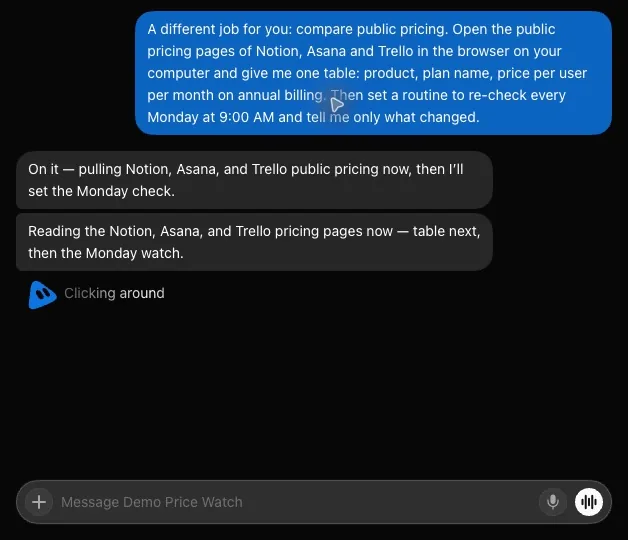
- One request in plain words: what to compare, what to hand back, and when to check again.
- The Bot first says what it's about to do.
- This line shows while the Bot works, on a computer in the cloud.
The table arrived in the same chat about a minute and a half later. See the finished job, and what a Bot is made of.
Get the Grok Bot cheat sheet
One page to keep open while you use Grok Bot. Sign up and download it straight away. New guides follow by email. Free.
Thank you! Your cheat sheet is ready. Download the PDF
Sources
3
- SpaceXAI docs: Grok Bot docs.x.ai
- Cursor Help Center: Plans and billing cursor.com
- SpaceXAI: Grok Bot product page x.ai