Reference
Grok Bot pricing: every plan that includes it, from $20
Grok Bot has no plan of its own. It comes with Cursor Pro ($20), Pro+ ($60), Ultra ($200) and Teams, or by linking SuperGrok ($30 to $300) or X Premium+.
Last verified
On this page
Grok Bot has no subscription of its own. It comes with a paid Cursor plan, or with a SuperGrok or X Premium+ subscription that you link to a Cursor account. The cheapest way in is Cursor Pro at $20 a month.
#Find your route
Start with your own case. The picker turns the subscription you already have into the step to take and what it costs.
#What does each plan cost?
The picker shows one route at a time. Here are all ten together, with the monthly price and the one thing Cursor says about how much usage each plan carries.
| Plan | Price a month | Usage, in Cursor's words |
|---|---|---|
| Cursor Pro | $20 | "Weekly usage, below Pro+" |
| Cursor Pro+ | $60 | "Generous weekly usage, below Ultra" |
| Cursor Ultra | $200 | "Highest weekly usage" |
| Cursor Teams, Standard seat | $40 per user | "Follows the Teams plan allowance" |
| Cursor Teams, Premium seat | $120 per user | "Follows the Teams plan allowance" |
| Cursor Enterprise | Custom | "Managed by your admin" |
| SuperGrok | $30 | "Linked usage, below Plus" |
| SuperGrok Plus | $100 | "Generous linked usage, below Heavy" |
| SuperGrok Heavy | $300 | "Highest linked usage" |
| X Premium+ | Billed by X | "Linked usage, below SuperGrok Plus" |
- The six Cursor plans include Grok Bot, on Enterprise once an admin turns it on. The four below them get in through a link to a Cursor account.
- Cursor Ultra and SuperGrok Heavy are the same top tier. Neither gives more Grok Bot usage than the other.
- Not on the list: Cursor Hobby (the free plan), free Grok, SuperGrok Lite, SuperGrok Team and SuperGrok Enterprise.
#Two plans don't add up
Your Cursor account has one weekly usage meter. Pay for a Cursor plan and a SuperGrok or X Premium+ subscription together, and Grok Bot fills that meter from whichever gives more. The other adds nothing.
When a week isn't enough, two things do add usage:
- Move up a tier on the side you already pay for, such as Pro to Pro+ or SuperGrok to SuperGrok Plus. A Cursor upgrade takes effect at once.
- Turn on on-demand usage, which bills extra work through Cursor once the week runs out. Usage limits shows how to cap it.
#A link is permanent
The SuperGrok and X Premium+ routes carry a second rule. You sign in to Grok Bot with a Cursor account, then link your Grok or X account to it on the Get Started screen, and that link can't be undone or moved to another Cursor account, by you or by support.
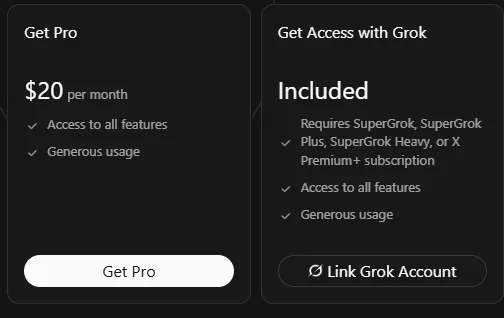
Before you click:
- Check which Cursor account you're signed in to. The usage goes to that account for good, and a free Cursor account is enough.
- One Cursor account pairs with one Grok or X account.
- Link once. After you change SuperGrok tier, Weekly usage can take up to 24 hours to follow, and you don't need to link again.
If the button isn't there, or the link won't take, Sign-in and linking has the fixes.
#What the price doesn't tell you
Whichever route you take, the price buys a weekly allowance. The size of that allowance isn't published for any plan, and each tier is only described against the one above it.
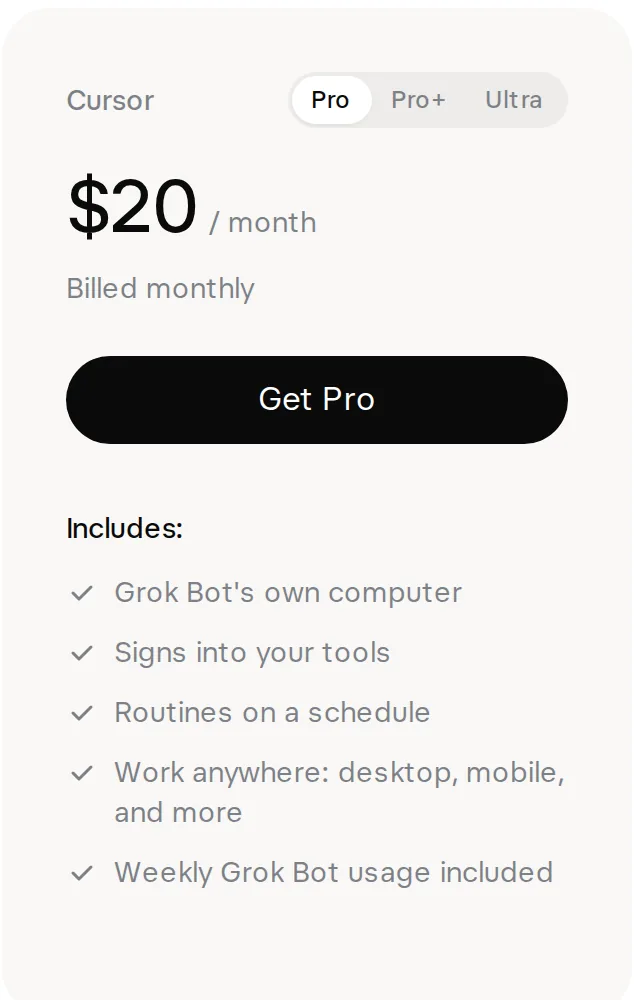
- The only line about how much you get. It gives no number.
Inside the app, usage shows as a percent of your week and a countdown to the reset. Usage limits covers what spends usage and what to do when a week runs out.
#How the entry price fell
If you've seen Grok Bot priced at $200 a month, that was the cheapest individual plan for its first ten days. The entry price fell twice in the fifteen days after launch.
Each date opened Grok Bot to more plans:
- 11 August 2026, launch: Cursor Ultra, SuperGrok Heavy and Cursor Teams Premium seats.
- 21 August: Cursor Pro+, SuperGrok Plus and every Cursor Teams seat, with a free trial for everyone else.
- 26 August: Cursor Pro, SuperGrok and X Premium+.
#Check: would a second plan help?
Now use the two-plan rule on the decision it was written for.
You're on Cursor Pro and your weekly usage ran out on Wednesday. You subscribe to SuperGrok at $30 a month and link it. What happens to your weekly usage?
- It grows: the SuperGrok usage is added to the Cursor Pro usage
- Grok Bot uses whichever of the two gives more, and you now pay for both
- SuperGrok takes over, and Cursor Pro stops billing
Show the answer
Grok Bot uses whichever of the two gives more, and you now pay for both
The two don't stack, and buying one doesn't cancel the other. Cursor hasn't said that SuperGrok carries more usage than Cursor Pro, so the extra $30 a month can leave your week exactly where it was.
To get more, move from Pro to Pro+, or turn on on-demand usage and keep working past the weekly amount.
The two don't stack, and buying one doesn't cancel the other. Cursor hasn't said that SuperGrok carries more usage than Cursor Pro, so the extra $30 a month can leave your week exactly where it was.
To get more, move from Pro to Pro+, or turn on on-demand usage and keep working past the weekly amount.
#Questions people ask
Can I pay yearly?
Yes, for a Cursor plan bought on cursor.com. Every price above is the monthly one. The iPhone and Android apps sell only monthly individual plans, so yearly billing, Teams and Enterprise are bought on the web.
What does Grok Bot cost on Cursor Enterprise?
Enterprise is a custom price agreed between your company and Cursor, and it isn't published. An admin turns Grok Bot on for the team at cursor.com/dashboard/bot and manages the usage.
Does Cursor Start, the plan sold in India, include Grok Bot?
Cursor hasn't said. Cursor Start is ₹649/mo, tax inclusive, and the plans Cursor names for Grok Bot are Pro, Pro+, Ultra and Teams. If you're on Start, sign in to Grok Bot with that account before you pay for anything else, and see whether it opens or asks you to pick a plan.
What happens if I upgrade in the middle of a month?
A Cursor upgrade takes effect at once. The credit for your old plan follows how much of its included usage is left, not how many days are left: if you've used it all, you owe the full price of the new plan. A downgrade waits until the end of the billing period.
How do I cancel or get a refund?
Cancel the plan that carries Grok Bot, because there's no Grok Bot subscription to cancel. A Cursor plan is cancelled at cursor.com/dashboard/billing. Cursor can refund a plan charge made in the last 14 days if you haven't used the subscription in that billing period. App Store and Google Play purchases are refunded by Apple or Google, and SuperGrok and X Premium+ by SpaceXAI or X. Ending a trial is covered in the free trial.
You know your route and the two rules. The next step is the app.
- First published.
Get the Grok Bot cheat sheet
One page to keep open while you use Grok Bot. Sign up and download it straight away. New guides follow by email. Free.
Thank you! Your cheat sheet is ready. Download the PDF
Sources
19
- Cursor Help Center: Plans and billing (Grok Bot) cursor.com
- Cursor Help Center: Link SuperGrok for Grok Bot cursor.com
- Cursor Help Center: Pricing and plans cursor.com
- Cursor docs: Team pricing cursor.com
- Cursor Help Center: Refunds cursor.com
- Cursor Help Center: Subscribe from the mobile app cursor.com
- Cursor Help Center: Cursor Start cursor.com
- Cursor pricing page cursor.com
- SpaceXAI: Grok Bot product page (the pricing card pictured) x.ai
- SpaceXAI: Grok plans and prices x.ai
- Grok: SuperGrok plans grok.com
- SpaceXAI docs: Grok Bot frequently asked questions docs.x.ai
- SpaceXAI docs: Grok Bot for teams and enterprises docs.x.ai
- SpaceXAI: Grok Bot is now included with more plans x.ai
- Grok Bot on X: launch, 11 August 2026 x.com
- Grok Bot on X: Pro+, SuperGrok Plus and Teams, 21 August 2026 x.com
- Grok Bot on X: Cursor Pro and SuperGrok, 26 August 2026 x.com
- Cursor forum, staff reply: Cursor Ultra and SuperGrok Heavy are the same tier forum.cursor.com
- Michel Szabo on X: screenshot of the Get Started with Grok Bot screen x.com