Grok Bot usage limits: weekly usage and on-demand explained
Grok Bot has two meters: Weekly usage, included and reset each week, and On-demand usage, billed through Cursor. See which work uses which and how to cap it.
Last verified
On this page
Grok Bot counts usage on two meters: Weekly usage, which comes with your plan and resets every week, and On-demand usage, which is extra, billed through Cursor, and only starts if on-demand is turned on. On an individual plan, weekly usage is Grok Bot's own pool, separate from your Cursor plan's usage and from your Grok limit.
#What spends which meter?
Three meters can move while you and your Bots work, and two of them belong to Grok Bot. Pick a kind of work to see which meter pays for it, then change how your week is going.
Why one reply costs more than another, and how to make a week go further, is in Usage running out.
#Is Grok Bot usage separate from Cursor and Grok?
On an individual plan, yes. Grok Bot's weekly usage is a pool of its own on your Cursor account, and the table shows where a Bot's work is counted on each kind of plan.
| Your plan | Where a Bot's work is counted |
|---|---|
| Cursor Pro, Pro+ or Ultra | Grok Bot's own weekly usage, separate from the usage your Cursor plan includes. |
| SuperGrok, SuperGrok Plus, SuperGrok Heavy or X Premium+, linked | Grok Bot's own weekly usage, on your Cursor account. It isn't your Grok limit, and it never shows in the Grok app. |
| Cursor Teams seat | In Cursor's words, usage "draws from the Teams plan's usage allowance for that seat". Each seat has its own weekly Grok Bot usage, separate from the Cursor Models and Other Models pools. |
| Cursor Enterprise | "Managed by your admin". |
- The separation ends when the week does. Past 100%, with on-demand on, Bot work is billed from the same on-demand balance as everything else on your Cursor account.
- The two reset on different cycles: Grok Bot's usage by the week, a Cursor plan's own usage by its billing month.
- A Cursor plan and a SuperGrok or X Premium+ link don't add together. Grok Bot uses whichever gives more.
#Where to see your usage
Your usage is one click away, on any screen of the app. Click your picture at the bottom left, then Weekly usage.
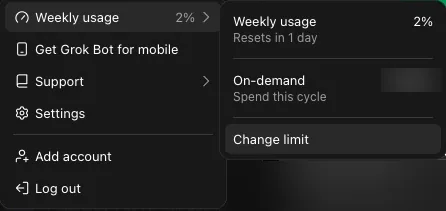
- The percent of this week's included usage that's spent.
- Resets in counts down to your next week. The app shows a countdown, not a date.
- On-demand shows what you've spent this cycle against your limit. Change limit opens the setting.
- The percent is your share of your plan's weekly allowance. The size of that allowance isn't published for any plan, so the percent and the countdown are the numbers to plan by.
- The same two meters are in Settings > Usage & Billing, where the first is titled Weekly usage limit.
- For the date of the reset, open cursor.com/dashboard in a browser and choose Spending. The Grok Bot card there shows it.
#What happens when you run out?
Grok Bot warns you before the week is gone, at 75% and again at 90%, in a banner above the message box. At 100% the limit banner appears, and what happens next depends on on-demand.

- The warning: "You’re at 90% of your weekly usage limit. It resets in 6 days." The 75% warning reads the same with 75%. Both carry one button, Get More Usage.
- The limit: "Weekly usage limit reached. It resets in 6 days." Its buttons are Increase limits and an upgrade button named for the next plan up, here Upgrade to Pro+.
- With on-demand off, your Bots stop until the countdown ends. Nothing is billed.
- With on-demand on, nothing stops. Bot work carries on as on-demand usage, up to your monthly limit.
- On a team plan the limit banner can offer Request Upgrade, which asks your admins.
#Turn on on-demand usage, with a cap
On-demand usage is how you keep working past the weekly amount. On an individual plan it stays off until you turn it on: open Settings > Usage & Billing and use the menu beside On-demand monthly limit.
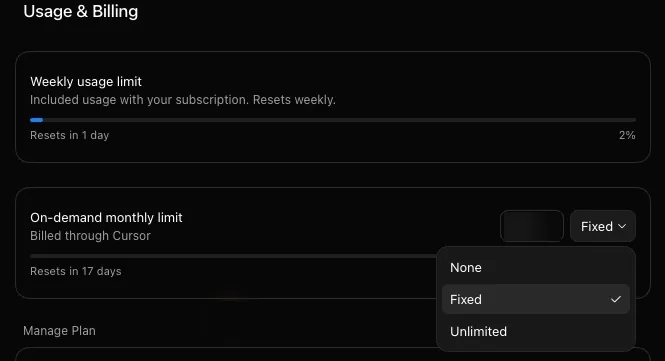
- None: on-demand is off. When the week runs out, your Bots stop.
- Fixed: on-demand is on, up to the dollar amount in the box beside the menu.
- Unlimited: on-demand is on, with no cap.
To set a cap, choose Fixed, type an amount and choose Save. The setting then shows a bar of its own: what you've spent against the cap, with a countdown to the month's reset. If the app asks for a card, add it on the web: cursor.com/dashboard, then Spending, then Monthly Limit.
- The cap is monthly. It doesn't reset with your week.
- The cap covers your whole Cursor account, so anything you run in Cursor past your plan's included usage counts toward it too. Grok Bot can't have a cap of its own.
- The cap isn't a hard stop. A Bot that's already working can finish and go a little past it.
- On-demand usage is billed by the work, at the cost of the tokens used. There's no price per message, and usage already spent isn't refunded.
#Check: who pays on Thursday?
Try the rules on one case.
Your weekly usage hit 100% on Wednesday, and on-demand is set to Fixed. On Thursday your Bot answers three messages. What pays for them?
- Nothing. The Bot can't answer until the week resets
- On-demand usage, billed through Cursor and counted toward your monthly limit
- The usage your Cursor plan includes
Show the answer
On-demand usage, billed through Cursor and counted toward your monthly limit
With on-demand on, running out of weekly usage doesn't stop a Bot. Its work moves to on-demand usage, and never to the usage your Cursor plan includes.
With the menu on None, the first answer would be the right one.
With on-demand on, running out of weekly usage doesn't stop a Bot. Its work moves to on-demand usage, and never to the usage your Cursor plan includes.
With the menu on None, the first answer would be the right one.
A cap helps when a week keeps running out, and so does spending less of it.
Can my usage reset early?
Not on request. Weekly usage resets when its countdown ends. The Grok Bot account on X has announced resets of everyone's limits on 26 August, 5 September and 2 October 2026, and hasn't promised another.
On-demand is set to None. Can anything still be spent past 100%?
Only credits. If your Cursor account holds referral or promo credits, they're spent after weekly usage and before any paid on-demand usage, and a limit of zero doesn't hold them back. No card is charged.
I subscribed in the iPhone or Android app. Where do I turn on on-demand?
On the web. Open cursor.com/dashboard, sign in with the same account, choose Spending and set Monthly Limit under On-Demand Usage. You add a card there, and it covers on-demand usage only. Your plan stays billed by Apple or Google.
I'm on Cursor Teams. Who controls on-demand?
Your admins. On Cursor Teams on-demand usage starts switched on, and admins turn it off or set spend limits in the team dashboard. When a teammate uses a Team Bot you built, the usage counts against the teammate, not you. Teams has the rest.
What does the warning say on the phone?
"You've used over 75% of your weekly usage limit. Resets in 6 days.", with a Get more usage button. The phone shows the same meter as the desktop, because both read one Cursor account.
Does the free trial have weekly usage?
No. The trial is a single usage credit, and it isn't refilled each week. The free trial covers what it gives and how it ends.
- First published.
Get the Grok Bot cheat sheet
One page to keep open while you use Grok Bot. Sign up and download it straight away. New guides follow by email. Free.
Thank you! Your cheat sheet is ready. Download the PDF
Sources
22
- Cursor Help Center: Plans and billing (Grok Bot) cursor.com
- Cursor Help Center: Grok Bot FAQs cursor.com
- Cursor Help Center: Usage-based charges cursor.com
- Cursor Help Center: Spend limits cursor.com
- Cursor Help Center: On-demand usage for mobile subscriptions cursor.com
- Cursor Help Center: Group chats and Bot-to-Bot messages cursor.com
- Cursor Help Center: Routines cursor.com
- Cursor docs: Team pricing cursor.com
- SpaceXAI docs: Settings and notifications docs.x.ai
- SpaceXAI docs: Grok Bot for teams and enterprises docs.x.ai
- SpaceXAI docs: Team Bots docs.x.ai
- SpaceXAI: Grok Bot is now included with more plans x.ai
- SpaceXAI: Grok Bot changelog (v0.25.0, v0.46.0, v0.59.0, v0.63.0) x.ai
- Grok Bot on X: suggestions don't count against your usage, 1 October 2026 x.com
- Grok Bot on X: usage limits reset for all users, 2 October 2026 x.com
- Grok Bot on X: usage limits reset for all users, 5 September 2026 x.com
- Grok Bot on X: weekly limits reset, 26 August 2026 x.com
- Cursor forum, staff reply: which work is counted on which pool forum.cursor.com
- Cursor forum, staff reply: Grok Bot's weekly pool is separate on Cursor Pro forum.cursor.com
- Cursor forum, staff reply: credits are spent before on-demand forum.cursor.com
- Cursor forum, staff reply: an idle chat spends nothing forum.cursor.com
- Image: the 90% and limit banners (@filedfyi on X) x.com