Is Grok Bot down? How to check, and what to do
Grok Bot's status is the Grok Bot row on status.cursor.com. See what an outage looks like in the app, what to do while it lasts, and how to tell it's only you.
Last verified
On this page
To see whether Grok Bot is down, open status.cursor.com and read the row named Grok Bot. The app doesn't show service status, so that page is the place to check. If an incident is open, wait until it's marked Resolved, and leave the app and the computer alone until then.
#Check the Grok Bot row on the status page
Cursor runs the service behind Grok Bot, so Grok Bot's status is on Cursor's status page. Open status.cursor.com in a browser and scroll to the row named Grok Bot.
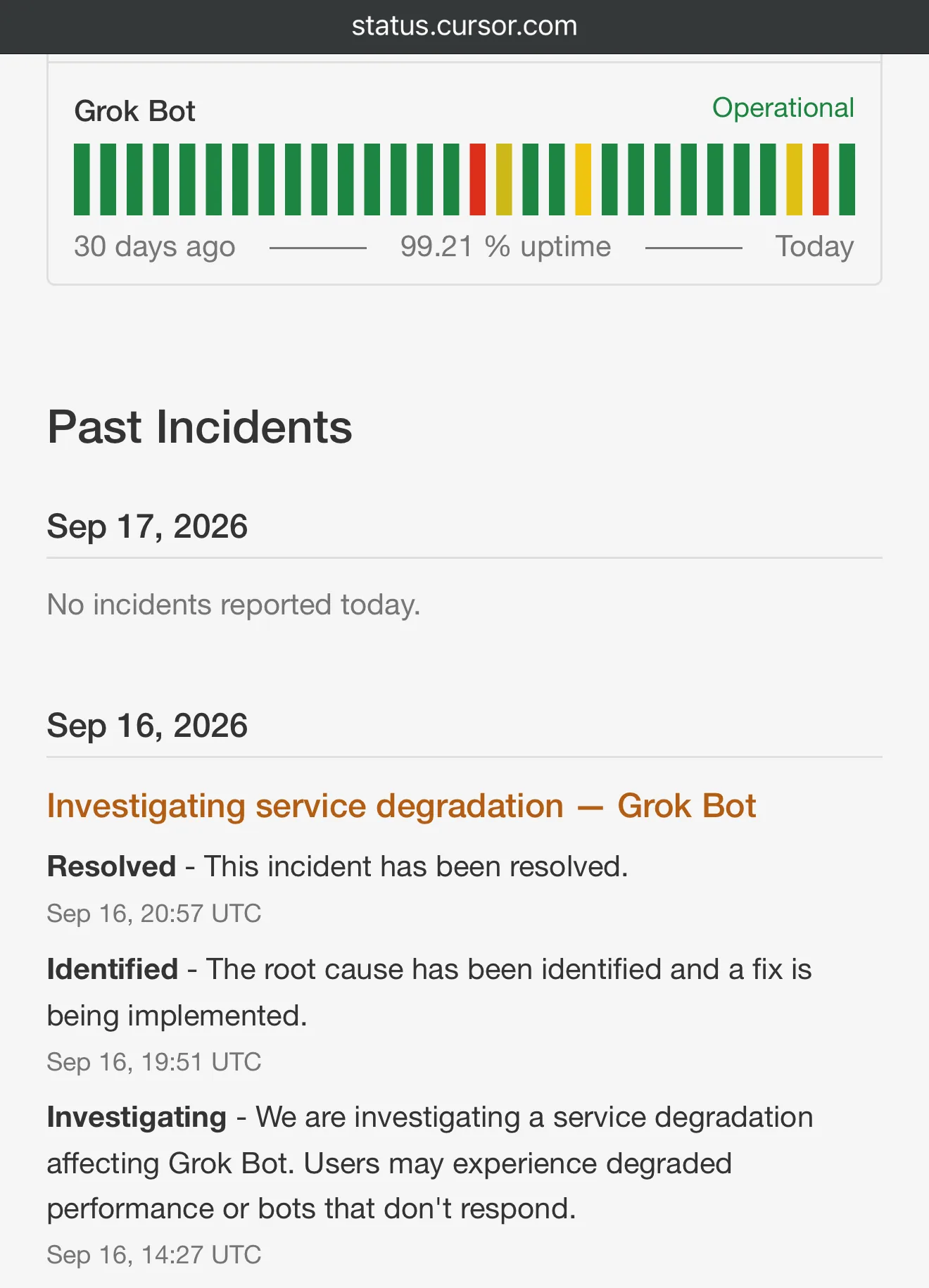
- The row's state. Operational means no incident is open. The other states are Degraded Performance, Partial Outage, Major Outage and Maintenance.
- One bar for each day. A red or yellow bar is a day that had an outage.
- Incidents are listed under the rows, each with its updates, newest first. Resolved is the update that ends one.
- Read the row, and open any incident in progress. An incident's title doesn't always name Grok Bot. Seven of the 21 so far were titled for a model, for another Cursor product or for nothing in particular, and listed Grok Bot among the parts affected.
- Subscribe if you rely on your Bots. The page has a subscribe button, which sends you its updates.
- Skip status.x.ai. SpaceXAI's own status page covers Grok the chat app, the API and x.ai's sites. It has no row for Grok Bot, so a green page there says nothing about your Bots.
#What an incident looks like inside the app
During an incident the app shows the same messages it shows for any failure, and the one most people meet is this banner.

Here are four of the status page's own wordings, each with the date it appeared, beside what that looks like in the app.
| On the status page | In the app |
|---|---|
| “Users may experience degraded performance or bots that don't respond.” (2026-09-16) | Bot failed to respond on every Bot, slow replies, or messages marked Failed to send |
| “Some users may be unable to reach their Grok Bot computer, and Recover or Reset may fail.” (2026-09-07) | Reconnecting, then “Can’t reach your computer”. Recover failed or Reset failed if you try either one |
| “Some trigger fires may be dropped.” (2026-09-03) | A routine doesn't run when its time or its trigger comes |
| “an issue causing Grok Bot connectors to hang” (2026-08-18) | A Bot stalls on a step that uses a plugin |
Each of those messages has its own entry in Error messages.
#What to do while an incident is open
An incident is a fault in the service that sits between your app and your Bots' computer. Nothing you do at either end reaches it.
- Wait for Resolved. Keep the status page open, or subscribe to it. The incident is over when the page marks it Resolved.
- Don't reset the computer. A reset doesn't fix a service fault, and it can lose very recent changes when the computer can't be reached to save them first.
- Don't reinstall the app. Signing out and making a new Bot don't help either.
- Send your message again afterwards. A message sent during an incident isn't retried for you.
- Run missed routines by hand. A routine due during the incident of 2026-10-03 didn't run, and on 2026-09-03 some trigger fires were dropped. Check your routines, and ask a Bot to run any that missed its time.
Your chats are stored apart from the computer, so they're there when the service comes back.
#How long incidents have lasted
From 2026-08-18 to 2026-10-06 the status page listed 21 incidents that named Grok Bot. Twenty of them have an end time, and the chart shows how long each one ran.
- Seven lasted an hour or less. The shortest, on 2026-09-28, took 13 minutes.
- Twelve were over within two hours.
- Three ran longer than four hours, all between 2026-09-16 and 2026-09-18. The longest, on 2026-09-16, took 6 hours 30 minutes.
- The page rated eight of the 21 major and one critical. The 21st opened on 2026-10-06 at 19:27 UTC.
How long earlier incidents ran doesn't set the length of the next one. The updates on the status page are the only measure of one that's open.
#Tell an outage from a problem on your side
When the row reads Operational and a Bot still won't answer, three checks sort it out. Take them in order, and stop at the first one that gives you an answer.
Look at the Grok Bot row again
An incident in progress means the problem isn't yours: wait it out. The page can trail the start of a problem. On 2026-10-03 the fault began at about 06:00 UTC, and the incident was posted at 06:50 UTC. So when every Bot failed at once a few minutes ago, look again shortly before you change anything.
Message a different Bot, in a new chat
Send it one word. If that Bot answers, the service is up, and the problem is in one chat or one Bot: go to Bot not responding. If every Bot fails, go on to the third check.
Open Grok Bot on your phone, over mobile data
Turn off Wi-Fi on the phone and sign in with the same Cursor account. If your Bots answer there, the service and the computer are both fine, and your usual network is in the way: see the network fixes.
Still failing everywhere, with the row at Operational? Then the cause is on your account: your weekly usage has run out, or the computer your Bots share is stuck. Bot not responding takes those two in order.
Outage, or on your side? Sort each situation.
- Your Bots answer on your phone over mobile data, but not on your laptopThe service and the computer are fine. Your network is blocking the app.
- Weekly usage reads 100%Your Bots have stopped until the reset. An incident has nothing to do with it.
- One Bot is silent, and your other Bots answerThe service is up. Look in that Bot's chat for a card it's waiting on.
- Every Bot failed at once two minutes ago, and the row still reads “Operational”The page can trail a problem. Look again shortly before you change anything.
- An incident titled for xAI models lists Grok Bot as affectedThe title doesn't have to name Grok Bot. The list of affected parts does.
- The Grok Bot row reads “Partial Outage”Any state other than Operational means an incident is in progress.
Wait and watch the status page
Fix it on your side
Show the answer
Wait and watch the status page: The Grok Bot row reads “Partial Outage” (Any state other than Operational means an incident is in progress.); An incident titled for xAI models lists Grok Bot as affected (The title doesn't have to name Grok Bot. The list of affected parts does.); Every Bot failed at once two minutes ago, and the row still reads “Operational” (The page can trail a problem. Look again shortly before you change anything.)
Fix it on your side: One Bot is silent, and your other Bots answer (The service is up. Look in that Bot's chat for a card it's waiting on.); Your Bots answer on your phone over mobile data, but not on your laptop (The service and the computer are fine. Your network is blocking the app.); Weekly usage reads 100% (Your Bots have stopped until the reset. An incident has nothing to do with it.)
With an outage ruled out, the next page has the fixes for a Bot that still won't answer.
Cursor is having an incident. Is Grok Bot affected?
Only if the Grok Bot row says so. Each of Cursor's services has its own row on the status page, so the Cursor editor can have an incident while Grok Bot's row stays Operational. One other row matters to some Bots: Cloud Agents. A Bot that hands coding work to a Cursor Cloud Agent depends on that service too.
Where do I report a problem when no incident is listed?
Email hi@cursor.com with the exact message, your version and the request ID. Bot not responding shows where each of those comes from.
- First published.
Get the Grok Bot cheat sheet
One page to keep open while you use Grok Bot. Sign up and download it straight away. New guides follow by email. Free.
Thank you! Your cheat sheet is ready. Download the PDF
Sources
11
- Cursor Help Center: Grok Bot FAQs (Is Grok Bot down?) cursor.com
- Cursor status page (the Grok Bot row and its states) status.cursor.com
- Cursor status page: incident history (the 21 incidents that name Grok Bot, 2026-08-18 to 2026-10-06) status.cursor.com
- SpaceXAI status page (Grok, API and Services; no Grok Bot row) status.x.ai
- Cursor Help Center: Grok Bot computer (what a reset can lose, where chats are stored) cursor.com
- SpaceXAI: Grok Bot changelog (Failed to send) x.ai
- Cursor forum: staff on resending messages and running missed routines after the incident of 2026-10-03 forum.cursor.com
- Cursor forum: staff on messages that failed to send from 2026-09-16 forum.cursor.com
- Cursor forum: staff on why quitting and signing out don't help during a service fault forum.cursor.com
- Image: the status page with the Grok Bot row and an incident (Cursor forum) forum.cursor.com
- Image: the Bot failed to respond banner (@AmericanIrish on X) x.com