Is Grok Bot free? How the free trial works
Grok Bot is not free, but a free Cursor account can claim a trial: a usage credit with a 7-day window. One large task can use it all. Cancelling costs nothing.
Last verified
On this page
Grok Bot isn't free: no free plan includes it, on Cursor or on Grok. A free Cursor account can claim a free trial, which gives you a limited amount of usage to spend within 7 days and never turns into a paid plan.
#What the free trial is
The trial is the first of three choices on Get Started with Grok Bot, the screen the desktop app opens on when your Cursor account has no plan. Its column gives the terms.

- The trial is free, and it asks for a card. The card isn't charged unless you subscribe to a plan yourself.
- Limited usage is a credit: one fixed amount of usage. Its size isn't published.
- Activate Trial starts it.
- A credit. The usage you get is a single amount. It isn't refilled each week the way a paid plan's usage is.
- A 7-day window. Whatever is left of the credit after 7 days goes with the trial.
- Every feature. Only the amount of usage is limited.
The same trial can be started in a browser, at cursor.com/bot/onboarding. Set up Grok Bot covers installing the app and signing in.
#What uses the trial up?
Once the trial is running, the credit goes down with the work your Bots do: the steps a Bot takes, and the text it reads and writes along the way. The number of messages you send doesn't come into it, as one request shows.
- One message from you. The credit doesn't count messages.
- The Bot's steps, and everything it read on the way. This is what the credit counts.
- One big task can use the whole credit in a single run. Used credit isn't restored or topped up.
- Routines draw on it too, every time one runs.
- The percent counts up. The meter in Settings > Usage & Billing shows how much of the credit is spent, so 100% means it's gone. Look there before you start a long job.
Usage running out explains why one reply costs more than another.
#What happens when the trial ends?
The trial ends when the credit is used up or the 7 days pass. Either way your account goes back to the free plan, and Usage & Billing reads like this.
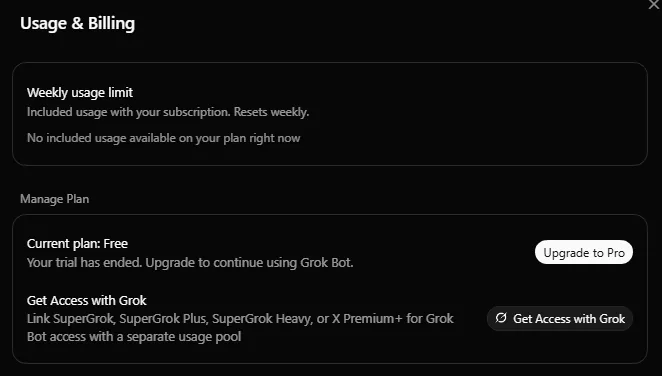
- The free plan has no usage of its own, so the meter is empty.
- “Your trial has ended. Upgrade to continue using Grok Bot.”
- The two ways back in: a Cursor plan, or a linked SuperGrok or X Premium+ subscription. Pricing shows which one is yours.
- Nothing is charged. The trial never becomes a paid plan.
- Nothing is deleted. Your Bots, chats and routines are saved, and so are the files on your Bots' computer. They carry on from where they stopped once the account has a plan.
- Your Bots stop replying. The app can stay silent, or show a connection error (Can't reach your computer), when the real cause is the empty credit. Don't reset the computer to fix that. Check Usage & Billing first.
- Credit gone with days to spare? Until the 7 days are up, you can still open your Bots' computer and take files off it yourself. After that, the app can't connect to the computer until the account has access again.
#Cancel the trial
The trial ends without your help, so you never have to cancel it to avoid a charge. To end it early, open Settings > Usage & Billing and choose Cancel Trial.
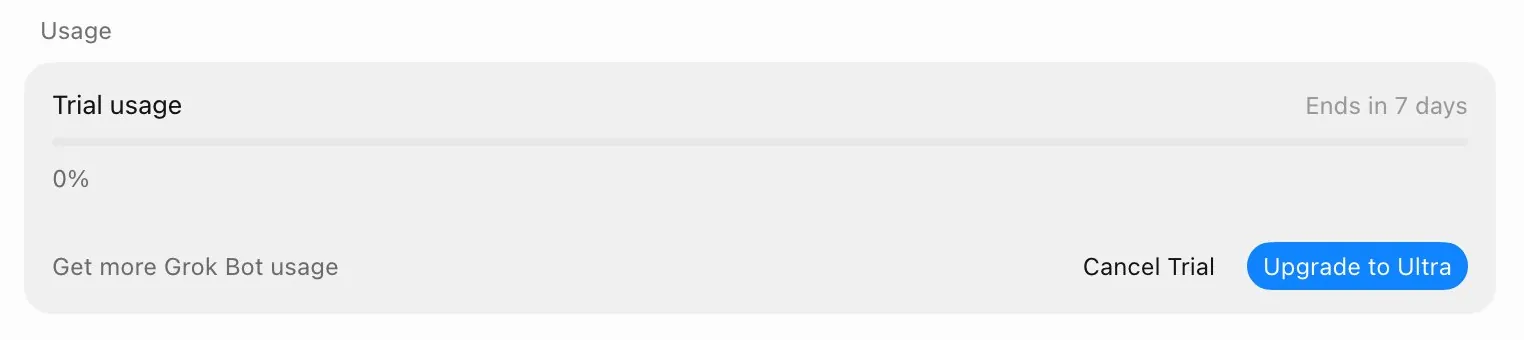
Cancelling does four things:
- It ends the trial right away.
- It removes whatever credit is left.
- It closes the offer. That account can't claim the trial again.
- It costs nothing.
Cancel Trial shows only on an account with no paid plan. If the button is missing on a free account, or cancelling doesn't take, write to Cursor support at hi@cursor.com.
#Which trial do you have?
Cursor's trial is one of three things that get called a Grok Bot free trial, and one of the other two ends in a bill. Tap where yours started.
#Check: your first trial task
Back to the Grok Bot trial, and the first choice you make in it.
You've just started the trial and want to see what a Bot can do. Which first task tells you the most for the least credit?
- Research forty competitors and build a full report with screenshotsA long job with many steps can use most or all of the credit in one run, and used credit isn't topped up.
- Attach one document and ask for a five-bullet summary that lists every date and decisionA short, tightly scoped task. You see how a Bot works, and what it cost, before you risk a bigger one.
- Set up a routine that checks your inbox every hourEvery run draws on the credit, and an hourly routine runs 24 times a day.
Show the answer
Attach one document and ask for a five-bullet summary that lists every date and decision A short, tightly scoped task. You see how a Bot works, and what it cost, before you risk a bigger one.
Afterwards, open Settings > Usage & Billing and see how far the percent moved. That's your yardstick for the next task.
Ready to try it? Start with the app.
Can I get a second trial, or more trial credit?
No. Used credit isn't restored or topped up, and after Cancel Trial the account can't claim the trial again.
Does the weekly reset refill the trial?
No. Weekly usage belongs to paid plans and linked subscriptions. The trial is one credit, and usage limits covers how the weekly kind works.
The trial won't accept my card. What now?
The card check doesn't work in every country. If yours is refused, a paid route is the dependable one: Cursor Pro, or SuperGrok linked to a Cursor account.
How do I cancel a paid plan or get a refund?
The Grok Bot trial has nothing to refund, because it charges nothing. Cancelling a plan, and who refunds what, is in Pricing.
- First published.
Get the Grok Bot cheat sheet
One page to keep open while you use Grok Bot. Sign up and download it straight away. New guides follow by email. Free.
Thank you! Your cheat sheet is ready. Download the PDF
Sources
15
- Cursor Help Center: Plans and billing (the trial, Cancel Trial, the App Store intro offer) cursor.com
- Cursor Help Center: Subscribe from the mobile app cursor.com
- Cursor Help Center: Grok Bot FAQs cursor.com
- Cursor Help Center: Routines cursor.com
- SpaceXAI: Grok Bot changelog (v0.18.0, v0.33.0, v0.37.0) x.ai
- Cursor docs: Admin API, Grok Bot (the Enterprise trial) cursor.com
- SpaceXAI docs: Get started docs.x.ai
- Cursor forum, staff reply: where the trial starts, and that it asks for a card forum.cursor.com
- Cursor forum, staff reply: the card check, by region forum.cursor.com
- Cursor forum, staff reply: nothing is deleted when trial usage ends forum.cursor.com
- Cursor forum, staff reply: what a used-up trial looks like, and what the percent means forum.cursor.com
- Cursor forum, staff reply: a used-up trial can show as a connection error forum.cursor.com
- Image: the Start a Trial column of Get Started with Grok Bot (Michel Szabo on X) x.com
- Image: Usage & Billing after a trial has ended (@Farizaamir on X) x.com
- Image: the trial meter and Cancel Trial (@xmglab on X) x.com