Learn
What is Grok Bot? How it works and who makes it
Grok Bot gives you named AI Bots that each keep a job, work on a shared cloud computer and come back when they need you. Made by SpaceXAI, runs on Cursor.
Last verified
On this page
Grok Bot is an app that gives you Bots: named AI assistants that each keep a job, do the work on a computer in the cloud, and come back to you when they need you. SpaceXAI announces and documents it, and it runs on Cursor. It's in beta.
#What Grok Bot looks like
Grok Bot looks like a chat app. What's different is what happens after you send a message: the Bot goes away to do the job, then brings back the result.
Here is a Bot named Demo Price Watch, after one request to compare three companies' pricing pages.
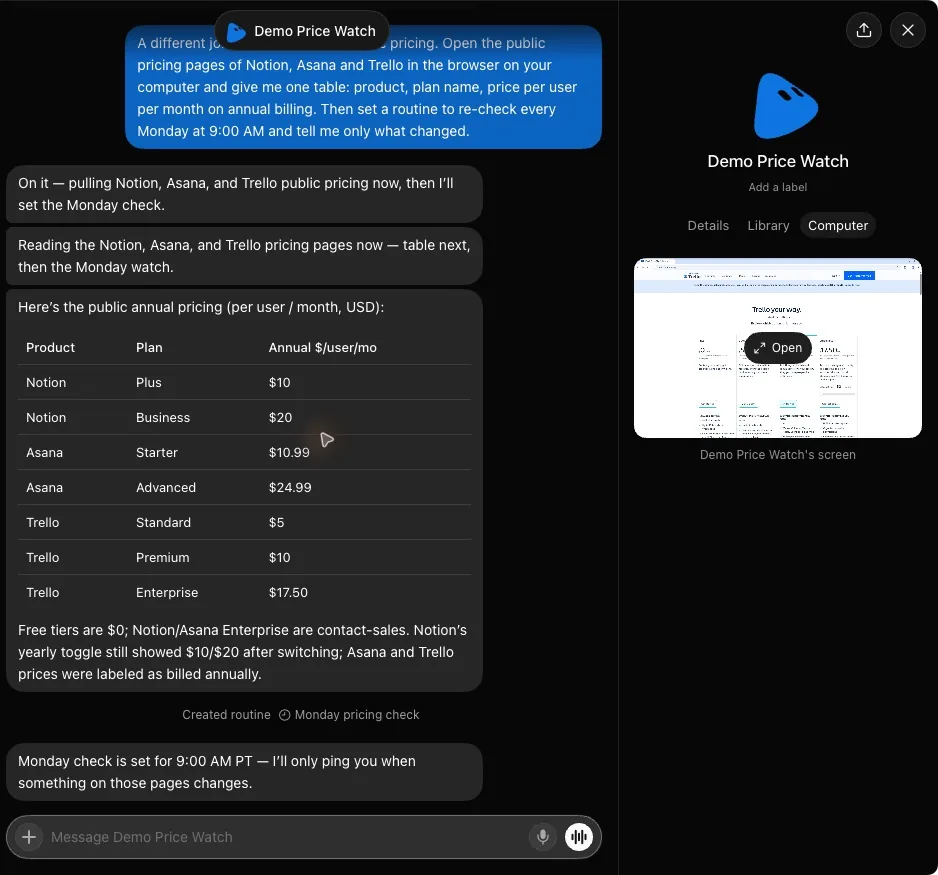
- One message in plain words: what to compare, and to check again every Monday.
- About a minute and a half later the answer is in the same chat, as a table.
- The Bot's screen on its computer in the cloud, still showing the last page it read.
The computer you sent the message from did none of that work. The next two sections take the picture apart: what a Bot is made of, then where the work happened.
#What a Bot is made of
A Bot is a name and a job, plus five things that let it do the job. Two of the five are the Bot's own. The other three belong to your account, so every Bot you create has them from its first message.
Each part has a lesson of its own.
| Part | What it is |
|---|---|
| A name and a job | You name a Bot for one kind of work, then tell it that job in a message. Create your first Bot shows how. |
| Its own chat | Where you ask and where the Bot answers. Each Bot keeps its own conversation and remembers what it learns there. |
| Routines | Jobs a Bot repeats on a schedule, or when something happens. See routines. |
| The cloud computer | One computer with a browser, files and a terminal, where all your Bots work. See the shared computer. |
| Plugins | Connections to apps such as Gmail and Slack. Connect one and every Bot can use it. See plugins. |
| Skills | A task you showed a Bot once, saved so any of your Bots can run it again. See skills. |
#Follow one message from ask to answer
Follow the request in the picture above from start to finish. Press Next to move it along, and watch where the work lands.
- You send one message, from your computer or your phone.
- Within seconds the Bot says what it's about to do. Then it takes the job to its computer in the cloud.
- On that computer it opens websites in a browser and saves files. For apps you've connected, it uses their plugins. Your own computer isn't involved, so you can close it.
- If a step needs you, such as an approval or a password, the Bot stops and asks you in the chat.
- When the job is done, the result arrives in the same chat.
- Close the app, your laptop or your phone while a Bot is working, and the job carries on. Routines keep running too.
- While a Bot is waiting for you, its row in the sidebar reads Waiting for you. Approvals covers what a Bot asks about, and how to change that.
#One message, a routine or a Bot of its own?
Most work you hand over comes in one of three sizes. A one-off is a message to a Bot you already have. A job that repeats is a routine on that Bot. A new kind of lasting work, with its own apps and its own rules, is a new Bot.
Sort these six jobs by size.
Sort each job: what does it take?
- Find three hotels near Thursday's conferenceYou need the answer once. When it arrives, the job is over.
- Handle recruiting: find candidates and keep notes on each oneA whole area of work that runs for months. Give it one Bot, and that Bot's memory stays about recruiting.
- Post a digest of industry news every weekday at 8:00 AMOnly the news changes from day to day. Repeating the rest is what a routine is for.
- Look after expense reports from now on, with their own rules about what needs your OKLasting work with its own apps and its own rules. A Bot named for the job keeps what it learns about it.
- Check three competitors' pricing pages every MondayThe same job on a schedule. Ask a Bot to do it once, then to repeat it.
- Turn the attached spreadsheet into a one-page summaryA one-off with a clear finish. Any Bot you have can do it.
One message is enough
A routine
Its own Bot
Show the answer
One message is enough: Turn the attached spreadsheet into a one-page summary (A one-off with a clear finish. Any Bot you have can do it.); Find three hotels near Thursday's conference (You need the answer once. When it arrives, the job is over.)
A routine: Check three competitors' pricing pages every Monday (The same job on a schedule. Ask a Bot to do it once, then to repeat it.); Post a digest of industry news every weekday at 8:00 AM (Only the news changes from day to day. Repeating the rest is what a routine is for.)
Its own Bot: Look after expense reports from now on, with their own rules about what needs your OK (Lasting work with its own apps and its own rules. A Bot named for the job keeps what it learns about it.); Handle recruiting: find candidates and keep notes on each one (A whole area of work that runs for months. Give it one Bot, and that Bot's memory stays about recruiting.)
How many Bots you need goes further into when a second Bot earns its place.
#Grok, Grok Bot, Cursor and @grok: which is which
Five different things go by these names. Here is each one in a line.
| Name | What it is |
|---|---|
| Grok Bot | The app this site teaches: Bots with names and jobs that work on a cloud computer. Its account on X is @bot. |
| Grok | SpaceXAI's chat app. A different app with its own limits, so a paywall or a Weekly SuperGrok Limit message there says nothing about Grok Bot. |
| Cursor | An app for writing code with AI. The company behind it runs Grok Bot's accounts, billing and cloud computers. |
| @grok | An account on X that replies to posts. It isn't Grok Bot. |
| Cursor's bots | Rollouts and Security Review, two Cursor bots that work on pull requests for software teams. A different product. |
#Is Grok Bot just Cursor?
No. Grok Bot is its own app with its own download, and you don't open Cursor to use it.
It does run on Cursor:
- You sign in to Grok Bot with a Cursor account.
- Your usage and billing sit on that account.
- Your Bots' computer runs in Cursor's cloud.
SpaceXAI announces Grok Bot and writes its documentation, and Cursor has been part of SpaceX since August 2026.
#Which model does Grok Bot use?
You can't choose one. Grok Bot has no model picker: Cursor picks the model for each task, and the mix of models can change over time. Grok 4.7, released on 21 September 2026, was trained to understand how Grok Bot works.
With the names straight, the next step is to get the app and sign in.
When did Grok Bot come out?
On 11 August 2026, in beta, for Mac, Windows and iPhone. Linux, Android and iPad followed within a month. Platforms lists what each one needs.
How much does Grok Bot cost?
Grok Bot isn't sold by itself. It's included with Cursor Pro, at $20 a month, and with the Cursor plans above it. A SuperGrok or X Premium+ subscription gets you in too, once you link it to a Cursor account. Pricing lists every route.
Is Grok Bot free?
A free Cursor account can claim a trial. The trial is an amount of work, not a number of days, and a seven-day window applies as well. After that you need one of the paid routes. The free trial has the details.
Does Grok Bot work on a phone?
Yes, on iPhone, iPad and Android. From a phone you can message your Bots, answer approvals and watch a Bot's computer. A few things need the desktop app, such as Teach a task and changing a routine.
- First published.
Get the Grok Bot cheat sheet
One page to keep open while you use Grok Bot. Sign up and download it straight away. New guides follow by email. Free.
Thank you! Your cheat sheet is ready. Download the PDF
Sources
13
- SpaceXAI docs: Grok Bot docs.x.ai
- SpaceXAI docs: Create and manage Bots docs.x.ai
- SpaceXAI: Introducing Grok Bot x.ai
- Cursor Help Center: Grok Bot FAQs cursor.com
- Cursor Help Center: Sign in to Grok Bot cursor.com
- Cursor Help Center: Plans and billing cursor.com
- SpaceXAI docs: Settings and notifications docs.x.ai
- SpaceXAI docs: Grok Bot security docs.x.ai
- SpaceXAI docs: Grok Bot for Mobile docs.x.ai
- SpaceXAI: Introducing Grok 4.7 x.ai
- Cursor: Cursor is now a part of SpaceX cursor.com
- Cursor changelog: Rollouts and Security Review cursor.com
- Grok Bot on X: the official account x.com